¶ dorkbrain-led-panel
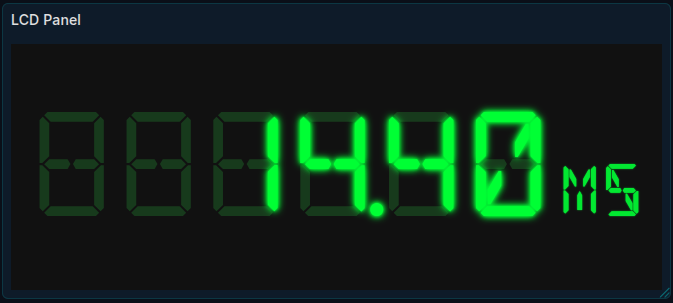
A Grafana panel plugin that renders LED-style text displays inside dashboards. Simulates physical LED/LCD segment displays using web fonts with configurable animations and effects.
¶ Downloads
- Source: Full source code for development
- Distribution: Pre-built plugin (tar.gz) for manual installation
- DEB Package: Debian/Ubuntu installer with post-install configuration guidance
¶ Features
- 6 LED/Dot Matrix Fonts - 14-segment alphanumeric and dot matrix styles
- 8 Color Themes - Green, Amber, Red, Blue, Cyan, White, Yellow, LCD presets
- Animation Effects - Blink, Fade, Pulse with threshold triggering
- Off-Segment Display - Authentic LED look with unlit segment backgrounds
- Auto Font Size - Automatically fits text to panel dimensions
- Grafana Units - Native unit formatting (bytes, percent, time, etc.)
- Count Animation - Smooth counting transitions with easing options
- Multi-Line Display - Show multiple values in a single panel
¶ Installation
¶ Requirements
- Grafana 10.0.0 or later
- Plugin signing disabled for unsigned plugins
¶ Option 1: DEB Package (Debian/Ubuntu)
The easiest method for Debian-based systems. The installer will detect your Grafana installation and provide configuration instructions.
- Download and install:
wget https://wiki.dorkbrain.com/downloads/led-panel/grafana-led-panel_1.1.0_all.deb
sudo dpkg -i grafana-led-panel_1.1.0_all.deb
-
Follow the post-install instructions to configure Grafana
-
Restart Grafana:
sudo systemctl restart grafana-server
- To remove the plugin:
sudo dpkg -r grafana-led-panel
¶ Option 2: Manual Install (All Distributions)
For non-Debian systems or manual control over installation.
-
Download the distribution archive for your version
-
Extract to your Grafana plugins directory:
cd /var/lib/grafana/plugins sudo tar -xzvf dorkbrain-led-panel-v1.1.0-dist.tar.gz -
Add the plugin to your Grafana configuration (
grafana.ini):[plugins] allow_loading_unsigned_plugins = dorkbrain-led-panelCommon config file locations:
/etc/grafana/grafana.ini/usr/share/grafana/conf/defaults.ini/usr/local/etc/grafana/grafana.ini
Or set via environment variable:
GF_PLUGINS_ALLOW_LOADING_UNSIGNED_PLUGINS=dorkbrain-led-panel -
Restart Grafana:
sudo systemctl restart grafana-server
¶ Verify Installation
After restarting, the plugin should appear in:
- Administration > Plugins - Search for "LED Panel"
- Dashboard > Add Panel - Under visualization types
¶ Available Fonts
¶ 14-Segment (DSEG)
Classic alphanumeric LED displays that can show letters and numbers.
| Font | Style | Preview |
|---|---|---|
| DSEG14 Classic | Classic 14-segment |  |
| DSEG14 Modern | Modern 14-segment |  |
¶ Dot Matrix
5x7 dot matrix fonts for a more readable display.
| Font | Style | Preview |
|---|---|---|
| DotMatrix | 1980s printer style |  |
| DotMatrix UK | Simple dot matrix | 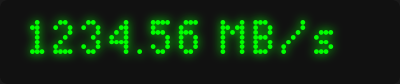 |
| Matrix Sans Screen | LED display board | 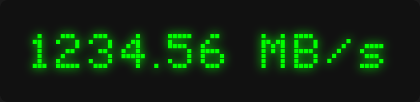 |
| Matrix Sans Print | Dot matrix printer | 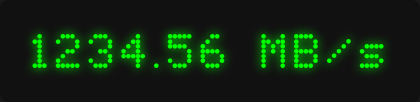 |
All fonts are licensed under the SIL Open Font License.
¶ Configuration Options
¶ Value
| Option | Description | Default |
|---|---|---|
| Calculation | How to reduce multiple values (Last, Min, Max, Mean, etc.) | Last * |
| Prefix | Text displayed before the value | (empty) |
| Suffix | Text displayed after the value | (empty) |
| Decimals | Number of decimal places | 2 |
| Min Digits | Minimum digits to display (zero-padded) | 1 |
| Max Digits | Maximum digit characters (excludes decimal point) | 10 |
¶ Units
| Option | Description | Default |
|---|---|---|
| Show Unit | Toggle unit display | Off |
| Unit | Grafana unit picker (bytes, percent, time, etc.) | none |
¶ Font
| Option | Description | Default |
|---|---|---|
| Font Family | LED font style | DSEG14 Classic |
| Auto Font Size | Automatically fit text to panel | Off |
| Font Size | Manual font size (12-200px) | 48 |
| Letter Spacing | Space between characters (-5 to 20px) | 2 |
¶ Colors
| Option | Description | Default |
|---|---|---|
| Color Theme | Preset color combinations | Custom |
| Segment Color | Color of lit segments (custom only) | #00ff00 |
| Background Color | Panel background (custom only) | #111111 |
| Show Off Segments | Display unlit segment backgrounds | On |
| Off Segment Color | Color of unlit segments (custom only) | #1a3a1a |
| Brightness | Overall display brightness (10-100%) | 100 |
¶ Color Themes
| Theme | Segment | Background | Description |
|---|---|---|---|
| Classic Green | #00ff00 | #111111 | Traditional green LED |
| Amber | #ffbf00 | #111111 | Warm amber display |
| Red | #ff3333 | #111111 | Alert/warning style |
| Blue | #00aaff | #111111 | Cool blue display |
| Cyan | #00ffff | #111111 | Bright cyan |
| White | #ffffff | #111111 | High contrast white |
| Yellow | #ffff00 | #111111 | Bright yellow |
| LCD | #1a1a1a | #a8b89a | Classic LCD calculator |
| Custom | (user defined) | (user defined) | Manual color selection |
¶ Glow Effect
| Option | Description | Default |
|---|---|---|
| Enable Glow | Add glow effect around lit segments | On |
| Glow Color | Color of the glow (custom theme only) | #00ff00 |
| Glow Intensity | Strength of glow effect (1-30) | 10 |
¶ Animation
| Option | Description | Default |
|---|---|---|
| Animation Effect | Visual effect (None, Blink, Fade, Pulse) | None |
| Animation Speed | Speed of effect (Slow, Medium, Fast) | Medium |
| Animation Trigger | When to animate (Always, On Threshold) | Always |
| Threshold Value | Value that triggers animation | 0 |
| Trigger When Above | Trigger when value exceeds threshold | On |
¶ Animation Timing
| Effect | Slow | Medium | Fast |
|---|---|---|---|
| Blink | 1s | 0.5s | 0.25s |
| Fade | 3s | 2s | 1s |
| Pulse | 2s | 1.5s | 0.8s |
¶ Scroll Animation
| Option | Description | Default |
|---|---|---|
| Scroll Mode | Scroll direction (None, Left, Right) | None |
| Scroll Speed | Pixels per second (10-200) | 50 |
¶ Count Animation
| Option | Description | Default |
|---|---|---|
| Count Animation | Enable smooth counting transitions | Off |
| Count Duration | Animation duration (100-5000ms) | 1000 |
| Count Easing | Animation curve (Linear, Ease In, Ease Out, Ease In-Out) | Ease In-Out |
¶ Display
| Option | Description | Default |
|---|---|---|
| Display Mode | Single value or multi-line | Single |
| Line Spacing | Space between lines (0-32px) | 8 |
| Max Lines | Maximum lines to display (1-10) | 4 |
¶ Examples
¶ Basic Usage
- Add a new panel to your dashboard
- Select "LED Panel" as the visualization
- Configure your data source query
- Adjust font, colors, and effects as desired
¶ Threshold-Based Alerting
Create a panel that blinks when a value exceeds a threshold:
- Set Animation Effect to "Blink"
- Set Animation Trigger to "On Threshold"
- Set Threshold Value to your alert level (e.g., 90)
- Enable Trigger When Above
The display will blink when the value exceeds 90.
¶ Multi-Metric Dashboard
Display multiple values in a single panel:
- Set Display Mode to "Multi-Line"
- Configure your query to return multiple series
- Adjust Max Lines as needed
- Set Line Spacing for visual separation
¶ Development
¶ Building from Source
# Install dependencies
npm install

# Development build (watch mode)
npm run dev

# Production build
npm run build

# Type checking
npm run typecheck
¶ Project Structure
dorkbrain-led-panel/
├── src/
│   ├── components/
│   │   ├── LEDPanel.tsx      # Main panel component
│   │   └── fonts.css         # Font-face definitions
│   ├── fonts/                # LED font files
│   ├── img/                  # Plugin logo
│   ├── module.ts             # Plugin entry + options
│   ├── plugin.json           # Plugin metadata
│   └── types.ts              # TypeScript types
├── dist/                     # Built plugin
├── checkpoints/              # Version archives
└── scripts/
    └── create-checkpoint.sh  # Archive creation script
¶ Adding Custom Fonts
- Place
.woff2and.ttffiles insrc/fonts/ - Add
@font-facedeclaration insrc/components/fonts.css - Add option in
src/module.tsfont family settings - Rebuild with
npm run build
¶ Changelog
¶ v1.3.5 (2026-06-24)
Fixed
- Updated react dependencies to fix loading errors on Grafana 13.1.0
¶ v1.1.0 (2026-01-21)
Added
- Color themes: 8 preset color combinations
- Animation effects: Fade and Pulse
- Threshold triggering for all animation types
- Configurable animation speed (Slow/Medium/Fast)
- 4 dot matrix fonts
Changed
- Restructured animation options for cleaner UI
- Default font changed to DSEG14 Classic
Removed
- DSEG7 fonts (poor unit text display)
¶ v1.0.0 (2026-01-20)
Initial Release
- 7-segment and 14-segment LED fonts
- Configurable colors, brightness, glow
- Off-segment display effect
- Blink animation with threshold support
- Scroll animation
- Count animation with easing
- Auto font sizing
- Grafana unit formatting
- Multi-line display
¶ Credits
¶ Fonts
- DSEG - keshikan/DSEG (SIL OFL)
- DotMatrix - Gissio/font_DotMatrix (SIL OFL)
- Dot-Matrix-Typeface - DanielHartUK/Dot-Matrix-Typeface (SIL OFL)
- Matrix Sans - FriedOrange/MatrixSans (SIL OFL)
¶ License
This plugin is provided as-is for personal and commercial use.
Font files are licensed under the SIL Open Font License.